
Integration with API-synchronization for match handling
In this scenario, the partner system integration will be tighter and more automated. Therefore, the effort to implement it will be higher.
To enable the synchronization for changes in Compliance Screening match handling, a partner system should subscribe to synchronization events of Compliance Screening MatchHandlingSyncDigest. This could be done directly in the Compliance Screening web application (Office – Administration – Synchronization – Partner system subscriptions) or via the synchronization API.
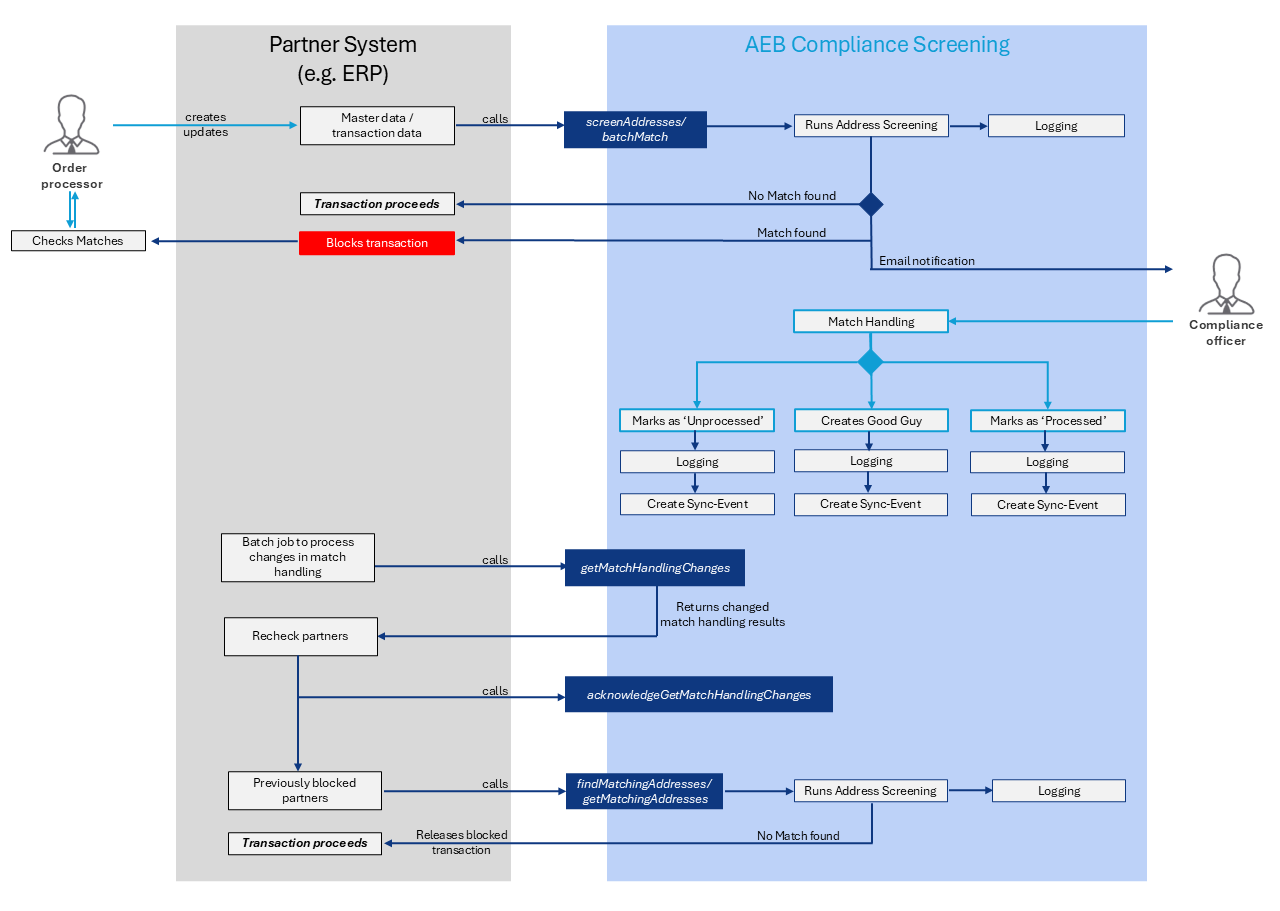
Step 1
In this scenario, a user starts by providing all relevant information to their partner system and triggers an API call to AEB Compliance Screening (either using the screenAddresses REST or the batchMatch SOAP API function).
Important: The clientReferenceId field for each address to be checked should be filled with a unique reference. This reference can later be used to map the synchronized match handling results to the corresponding records in your partner system. Please note that screened addresses with an empty clientReferenceId field cannot be synchronized using the Synchronization API.
This will trigger AEBs address screening algorithm and check all supplied addresses. The partner system will receive a response with the information which addresses resulted in potential matches, which in turn should block any associated transaction or business partner and further processing of such transactions. We recommend creating a dedicated field for the blocked/released status in business partners in your partner system. If you wish, you may also configure email notifications whenever a match has been found.
Step 2
The user will then evaluate all address matches in AEB Compliance Screening. This is usually done through AEBs Compliance Screening GUI. For address matches that are found to be false positives, “Good Guys” can be created.
Once an address matches has been handled, a synchronization event (journal entry) is generated and stored in Trade Compliance Management. The synchronization events are created only if the partner system has subscribed to synchronization events for match handling and contain information about the changed match handling results.
A batch job on the partner system should periodically call matchHandlingChanges [REST] or getMatchHandlingChanges [SOAP] to get the new results of the match handling. The addresses in the partner system corresponding to the changed match handling results can be re-checked (if a good guy was created) or remain blocked.
After the changed match handling results are processed and the corresponding matches are updated, the partner system should call acknowledgeMatchHandlingChanges [REST] or acknowledgeGetMatchHandlingChanges [SOAP] to mark the synchronization events, identified by the syncId returned in the response from matchHandlingChanges [REST] or getMatchHandlingChanges [SOAP], as processed.
To get more information about the synchronization API and about what changes in Compliance Screening match handling trigger the synchronization events see About Synchronization API.
Updated 6 months ago